
In this article
The time is almost here! Palworld's official 1.0 release is in just hours from now, and marks the largest update to game systems ever seen since its debut back at the start of 2024.
Excited to jump into the update? Here's all you need to know to get ready, from server prep to release times.
When does Palworld 1.0 Release?
The release times for Palworld 1.0 across essential timezones are:
EDT / US East Coast: ~11:30 PM (July 9th)
BST / UK - London: ~4:30 AM (July 10th)
CEST / Central Europe: ~5:30 AM (July 10th)
ICT / Vietnam: ~10:30 AM (July 10th)
JST / Japan: ~12:30 PM (July 10th)
As noted by the developers, these times are estimates, and the actual release may be offset a bit depending on developer needs.

What's changing in Palworld 1.0?
So much is changing in the new update that the developers have reported that their patch notes are larger than Steam's 32,000 character limit. Although we won't get those full notes until later today, it's safe to expect the biggest changes to explore in the game ever since it originally became publicly available.
We do have glimpses into some of the largest changes, though, which we have covered in our blog post HERE on some of the upcoming content! If you haven't checked out that post already, now is as good a time as ever to give it a quick read and get excited for what's to come in just a few hours.
How to prepare your server for Palworld 1.0
Given how massive this update is, there are a lot of things to be aware of as a server owner. Most notably:
The developers STRONGLY recommend starting a new save when heading into Palworld 1.0.
Due to massive changes to the game's internal structure and modding systems, the developers expect effectively all mods to be incompatible with the new update until creators update them to explicitly support the new patch.
If you do end up wanting to pull your existing world over to 1.0, it's expected that you won't benefit from the full extent of the changes to the game. Though we highly recommend making a backup of your save before restarting your server to update it, which you can do by following our guide here!
How to create a new world for the new update
There are two main ways you could approach creating a new world for the update.
First, you could do a full server reset once the update releases as the simplest method! This is best if you have mods installed, as it will help make sure you get a compatible save running as soon as the update releases. To do this:
Stop your server if it is not already.
Open the Settings tab on the left-hand side of your server panel.
Select the "Reinstall/Reset Server" button above the settings on the page.
Confirm to "Delete all files before reinstalling," and select 'Yes, reinstall server'
Then, once the server is started back up, you'll be running a fresh world!
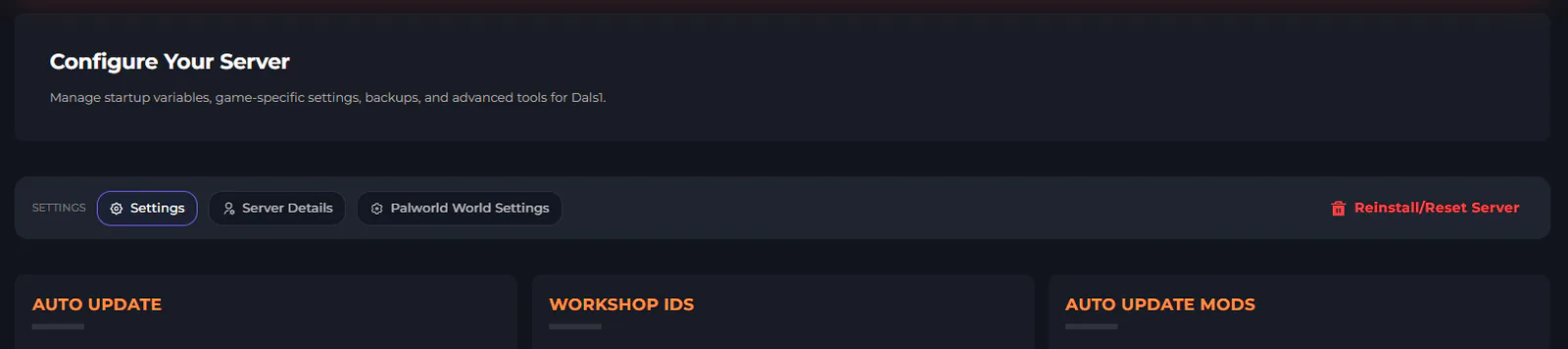
Otherwise, if you'd like a bit more control, you could do this through your file manager. This is okay if you don't have any mods installed and just want to swap the save file around:
Stop your server if it is not already.
Open the File Manager tab on the left-hand side of your server panel.
Navigate to the following folder directory:
/Pal/Saved/SaveGames/0There, you will see a folder with a long string of numbers and letters, such as: "442F96CC4B574A7E8F2C824CAB155768" — this is your world folder.
You can either delete this folder, or right click it and use the Rename option to name it something else if you want to keep a copy of the world for later.
Once either change is done, the next time your server is started, it will generate a new world!

Removing mods from your game client
You will also want to be certain to remove all mods from your game client as well until they have been confirmed as functional and updated for 1.0!
Even if you unsubscribe from a mod with your modloader or through Steam Workshop, remaining files may still be present and cause issues when you launch your game. As a result, manually deleting all mod files from your game directory and then verifying the integrity of your game files through Steam is the recommended method to make sure things are working well for the update.
The developers have put out their own guide in more depth on how you can make sure these are completely removed.
Invite your friends
Palworld is better with friends, especially when playing together on a Kinetic Hosting server!
Best of all, Pocketpair has confirmed that they have no plans to increase the price of the game following its 1.0 launch. It's even currently on sale for the Steam Summer Sale, running as -30% discount up until July 23rd! Now is the best time to pick up the game or share with your friends so you can all play together right as the update drops.
Then, consider checking out Kinetic Hosting as the best Palworld server host for the new update! We'll help make sure your server is running smoothly and get things up + running immediately so you can focus more on exploring the islands and all the new changes to the game. We've got a bunch more information on our Palworld game page here, as well!


:-rules-and-how-to-play-1784751435706-optimized.webp)