
In this article
As you continue to advance in Valheim, you'll quickly notice that your tools lose durability and can become unusable if not repaired. Since this applies to essential items like armor too, repairing your equipment regularly is essential to be able to survive the lands. Thankfully, this process isn't much of a challenge, and we'll cover the easiest method to repair your equipment below!
Repairing Your Equipment

If you've ever noticed the white line beneath items in your inventory, that's the durability of your item! As you use these tools or pieces of equipment, the durability will gradually deplete, eventually making the item unusable altogether.
In order to repair these items, you'll need to make sure you have a Workbench built. This is one of the first things you'd typically do when playing, as it's required to build most of the tools in the game in the first place. So you should have one by the point that your durability is wearing down!
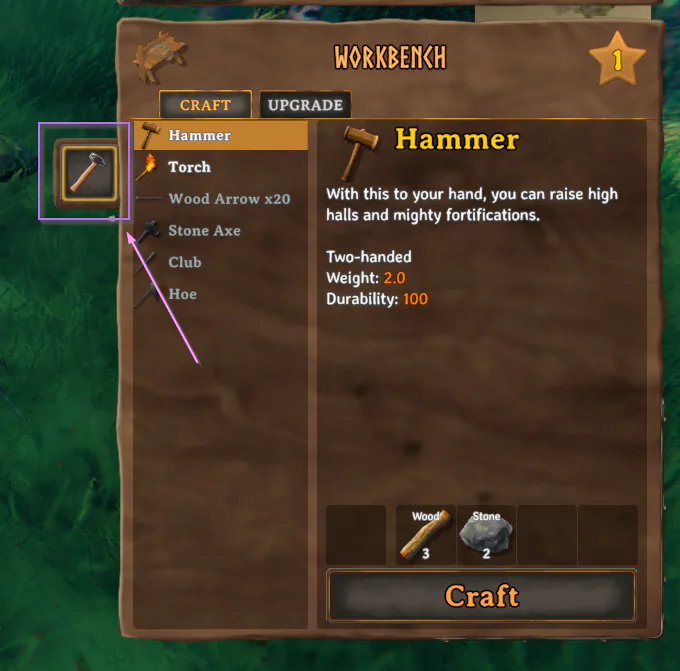
From within the workbench screen, on the right-hand side, you should see a small hammer button to the left of the crafting options.
As long as you have the equipment you want to repair in your inventory, clicking that hammer button will repair the items in your inventory! You may need to click it multiple times depending on how many items you have that need repaired, though, as it goes in order of the items in your inventory.
There is no resource cost for repairing your items, which makes fixing them super simple once you know how!