In this article
Minecraft's locator bar feature provides a way to find other players in your world through a compass-like display in your experience bar area.
If you don't want to be found in the locator bar while enabled, you have a few options to hide yourself!
Hiding Yourself from the Locator Bar
Sneaking/Crouching: If you hold shift, your indicator will not appear on other players' locator bars.
Wear a Mask: Wearing something on your head, like a mob head or a carved pumpkin, will also hide you from other players without sacrificing your speed.
Use an Invisibility Potion: While invisible from the effects of a potion, your location will be hidden from other players.
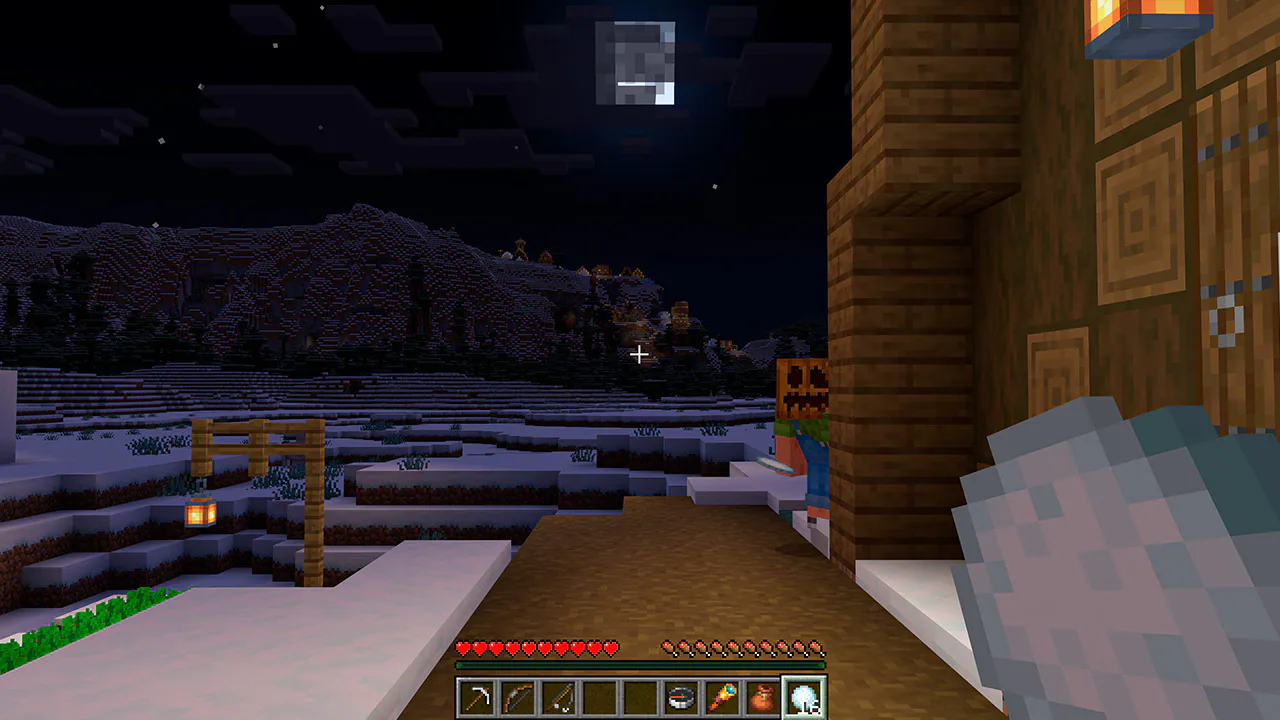
There are some other tricky ways around this, such as coming up behind someone that's earning experience, as doing so replaces their locator bar with their experience progress to the next level, but these tend to be more niche/unreliable methods.
How to Disable the Locator Bar
Thankfully, Mojang has also provided a method for disabling/removing the locator bar in your server altogether!
As long as you have operator status on your server / have access to cheat commands, you can use the built-in gamerule to disable this. The command you'll want to use to disable the locator bar this way is:
/gamerule locator_bar false

If you ever want to enable the locator bar again, you would just enter the opposite command (true) in the chat:
/gamerule locator_bar true