In this article
Ancient Cities are some of the most interesting underground landmarks you can uncover in Minecraft for more adventurous players. Especially with the new The Sift dimension coming to the game, these ruins are going to be more relevant than ever. We'll cover the easiest ways you can find one during your playthrough!
Quick Tips
Ancient Cities spawn only within Deep Dark biomes underground.
These cities will spawn around Y level -51; avoid searching above this level!
If you have cheat commands, you can use the /locate command to quickly find and teleport to the nearest one: /locate structure minecraft:ancient_city
Easiest Way to Find an Ancient City in Survival
The best way to find a deep dark biome with an ancient city in survival is to explore one of a few biomes that the deep dark has been known to spawn more frequently in. The Deep Dark biome can generate in the following biomes:
Most Commonly: Mountains
Can Generate Under: Savannahs, Groves, Forests, & Meadows
Will Not Generate In: Deserts, Swamps, Oceans, & Rivers
Once you've ensured that you're in a biome where the Deep Dark can generate, it's time to get to mining!
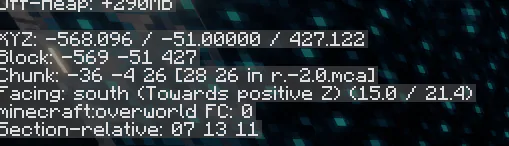
Ancient Cities will always generate with the base/floor level at an altitude of -51. This is the "Y" coordinate visible in the F3 / debug menu in-game. As a result, you'll want to make sure that you explore at that level or slightly above.
Since ancient cities are very tall on the inside, it's fine to dig around at a level within ~10-15 blocks higher than the floor level if you want to cover a larger area.
How to Find Ancient Cities Using Cheats
If you have operator privileges on your server, or access to cheat commands otherwise, you can also use a single command to quickly locate an ancient city! This would be done using the /locate command.
For an Ancient City in the latest versions of Minecraft, the exact command you'll want to use is:
/locate structure minecraft:ancient_city

This will then print the coordinates for the ancient city in your in-game chat, which you can also click in-game by opening the chat menu to teleport directly to the city.
NOTE: Minecraft's Y level for structures is set to the same as the level you're currently on when you run the command by default. You may need to manually update this to -51, or dig down after teleporting.