In this article
Terraria's modding scene is ever-growing, but there has always been one mod that looms above all the others. The Calamity Mod is one of the most famous mods for Terraria that serves as a massive expansion to the game and its content with all new bosses, difficulties, NPCs, biomes, tons of new items, and more!
Installing and getting started with the Calamity mod doesn't have to be hard. We'll help cover how you can get started and try to tackle all of the added (and extra challenging) content.
1: Getting Your Server
The first step, of course, is to start up a server of your own that you can install the mod onto. We'll be covering the steps using Kinetic Hosting's custom server panel for Terraria to help simplify things. We are constantly working to make sure that managing your server is as easy as possible!
To get things started with us, you can explore our available Terraria server hosting options here.
Since Calamity is such a huge overhaul mod, we'd recommend going with a server plan that offers at least 8GB of RAM for you and some friends to play on just to make sure things run extra smoothly and have room to grow.
2: Swapping to TModLoader
To actually support mods like Calamity, your server will need to be running TModLoader (instead of vanilla/default Terraria).
Thankfully, you can do this with just a few clicks with our custom panel. From the Change Game tab on the left-hand side of your server panel, you can search for "TModLoader" and use the one-click swap button from there so the panel can handle the rest of the installation entirely for you!

3: Installing Calamity
Now for installing the actual Calamity mod itself. Thankfully, we've also simplified this process in our panel, and even have a more in-depth quite on the process here for those that are curious.
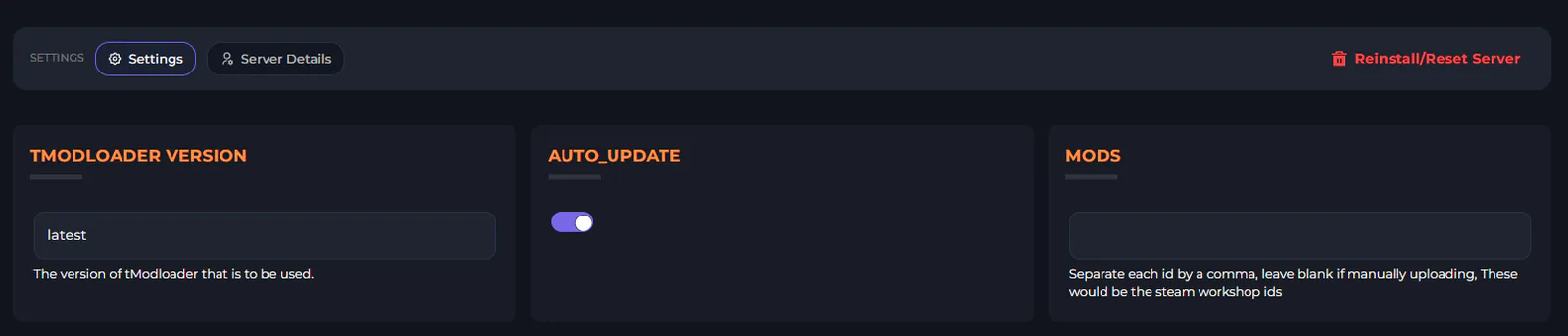
The short version, though, is that you will want to head to the Settings tab on the left-hand side of your server panel. There, you'll see a "Mods" box which prompts you to input mod IDs from Steam. A mod's ID is the end part of the mod URL when you are on the workshop page for a mod. For Calamity, for example, this would be: 2824688072

When you want to add multiple mods, you'd list out multiple mod IDs, just separated with a comma.
NOTE: You must also install the soundtrack/music mod for Calamity for things to function (ID 2824688266). A quick reference for the mod IDs for the main Calamity mods can be found below:
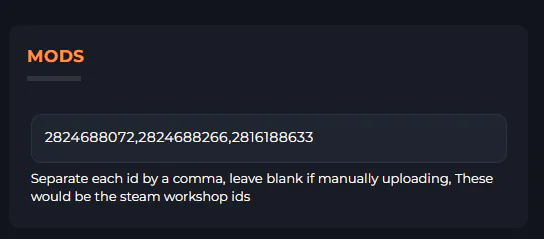
Calamity Mod: 2824688072
Calamity Mod Music: 2824688266
Vanilla Calamity Mod Music (Bonus): 2816188633
4: Start Your Server & Play
That's it! Your server is now fully ready for you to start up. Our panel will automatically handle the installation of your mods, and will take your server online once the installation is complete.
From there, you can join your server and play Calamity with your friends! Or, if you're stuck on how to join your server, we've also got an awesome guide on how you can connect in our knowledgebase.
Have any other questions?
Our fully human support team is always around and is more than happy to help out if you run into any questions or issues! We're here to help make sure you can focus less on troubleshooting issues and more on getting straight to playing and exploring the mod.
Otherwise, we also have a growing knowledgebase of tutorials and instructions for how to manage a Terraria server available here!