How to Craft a Map in Minecraft

Posted by Dals | 28 August 2026

Maps can be a really creative way to showcase the builds around your world in Minecraft, or even just a simple way of keeping track of where you are when you're playing in vanilla.


How to Craft a Map
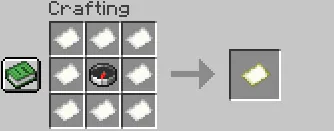
Crafting Map 1787936137572

To craft a map, you will need to place 1 compass in the middle of your crafting table, surrounded by 8 pieces of paper, as pictured above. If unfamiliar with the crafting process for these items, we've covered them down below as well!

Materials Needed:

  • 1 Compass

  • 8 Paper

Crafting Materials

How to Craft a Compass
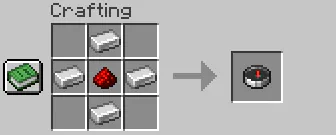
Crafting Compass 1787936148616

To create a compass, for use in the recipe for a map or otherwise, you will need to use a crafting table to place 1 redstone in the middle of the grid, and surround it with 1 iron on each side (4 iron total).

Materials Needed:

  • 1 Redstone

  • 4 Iron

How to Craft Paper

Crafting Sugarcane 1787936161058

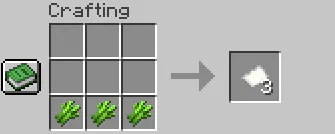
The crafting recipe for Paper is simple! You will need to use a crafting table to place 3 sugarcane along the bottom row of the grid. This will give you 3 paper total in return.

Materials Needed:

  • 3 Sugarcane

Display and navigation

Accessibility options

Personalise how Kinetic Hosting looks and how you move around it. Your choices are saved on this device.

Press Ctrl+K to search. When link hints are enabled, hold Shift to label every visible link and control.

High-contrast dark theme

Use black and dark backgrounds with white text and stronger borders throughout the site.

Keyboard link hints

Hold Shift to show a temporary key on every visible link and control. Keep holding Shift and type a label to activate it.

Keyboard navigation

Ctrl+K opens site search. When link hints are enabled, hold Shift to label every visible page link, menu item, order control and location. Keep Shift held while typing the displayed label, or release Shift to close the labels.

Search Kinetic Hosting

Search site pages, game servers, knowledgebase articles, blog posts, FAQs and modpacks.

Enter at least two characters to search the site.

↑↓ Select · Enter Open · Esc CloseCtrl+K