How to Make a Minecraft SMP
Posted by Cole | 27 January 2026
Today we’re going to talk about how to make a Minecraft SMP Server, at Kinetic Hosting we make this as easy as possible, follow along with the guide and you’ll have a server setup and ready to go in no time!
If you want to get a server to follow along, you can purchase a server from our website here. We offer the lowest price with the most features, check us out today!
Picking a Niche
In order to have a successful SMP, you’ll need to find a niche to base your server around. Many people pick Roleplaying and Life steal as a Niche, but the more individual and interesting your choice, the better!
This Niche will be the basis that you make your server around, it will decide which plugins or mods you’ll need and the advertising you choose to do.
Server Setup
There are a few things to consider first
You need to consider your server setup, if it’s going to be one server or part of a network, or if you want to use any mods.
If you want to use mods, you’ll need to use a Hybrid server type (This will allow you to use Plugins and Mods together).
We are going to assume that you wish to use only plugins for this setup, but if you wish to use only mods and plugins you can use a server type like Arclight, though we recommend against it, or you can use just mods using a server type like Forge or Fabric.
Server Type
For the most part, we recommend that you use Spigot, this can be installed on the Kinetic Panel by going to the Version Installer, clicking the drop down on the left and selecting “Spigot” and Installing the version that you want. You can see where each button is in the image below.
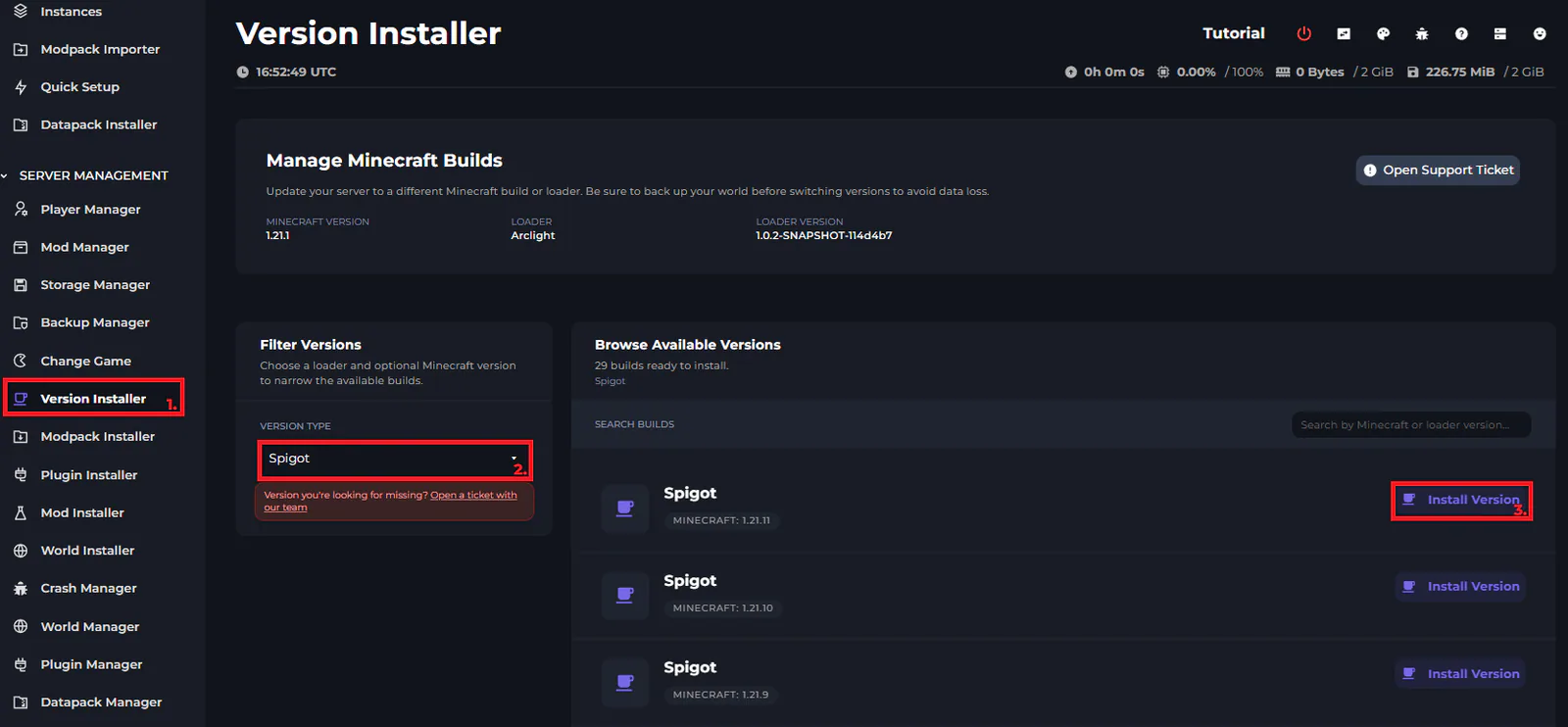
Once you have installed Spigot onto your server, you should restart it to ensure that the files are installed correctly.
Installing Mods and Plugins
The mods that you choose to install onto the server are entirely up to you, just note that these will also need to be installed onto the client. To install mods you will need to use a different server type to spigot.
In terms of plugins, we won't go into specific plugins as we already have a blog post on that which you can read here.
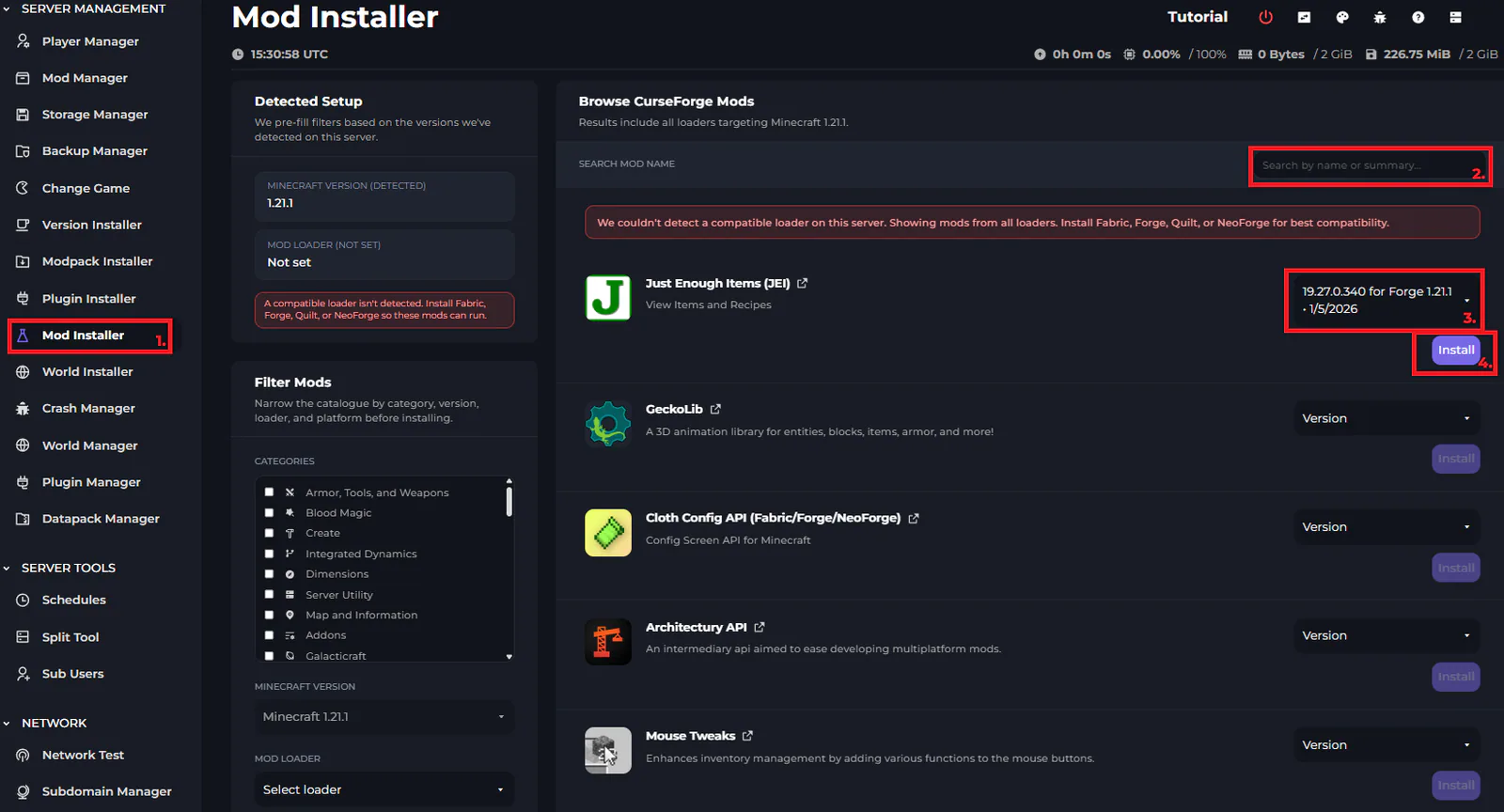
You can install mods on your server by going to the “Mod Installer” and searching for the specific mod you want, select the version and click “Install”, you can follow the below image.
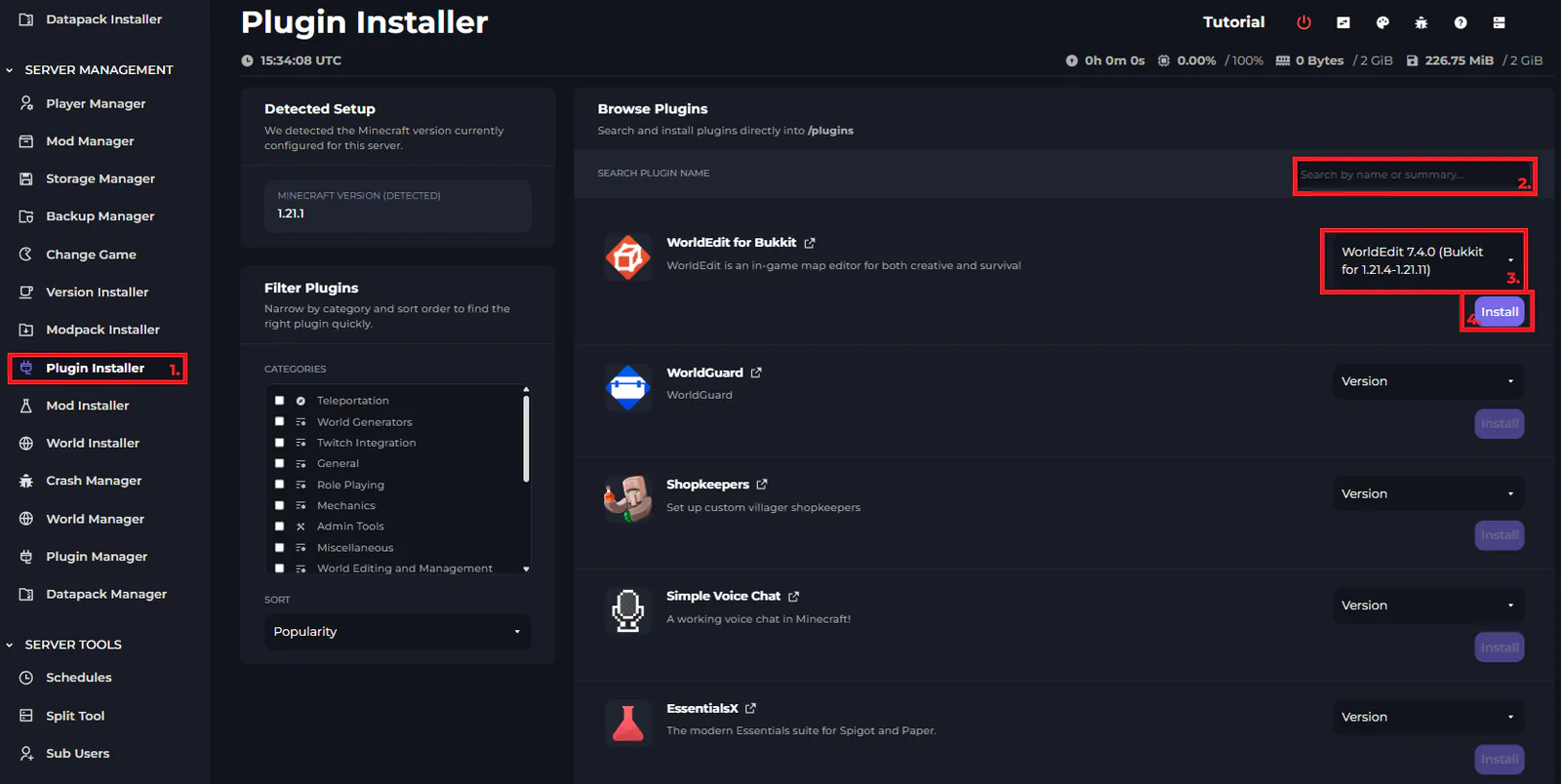
Installing Plugins is a very similar system, you can follow the image below.
Configuring Plugins
Each plugin has its own configuration file, in order to configure them correctly I would recommend looking for the specific documentation for each plugin.
As each plugin is difficult, I won't be able to go into depth about configuring plugins, but it is easy to do using the Kinetic Hosting File Manager.
Voting Sites
When people run an SMP, they often want to set their server up on Server Lists and voting sites, this is relatively easy to do, all you need is a voting plugin installed on your server (Like Votifier) and then you go to these voting websites and create a profile, linking a code from your voting plugin to the website.
It is important to have some form of incentive to vote for your server otherwise people may be hesitant.
What’s Next?
The next step is to get some people on the server! Advertising where available will help!
But what are you waiting for? Get your SMP Set up today with a server from Kinetic Hosting, the lowest prices with the most features, check us out here!
Start Your Own Server
Looking for a game server? Get set up in a few moments. With our one-click installers and simple packages.
Related Posts
How to Install a Minecraft Snapshot Release
Looking to try out the new features coming to Minecraft, or play on a specific snapshot? We'll help walk you through the easiest method of installing them!
Dals3 August 2026
Curseforge vs Modrinth: Which is Better to Use?
Have you seen the named CurseForge and Modrinth thrown around, but not sure which Minecraft launcher is best? We'll help break down some core differences!
Dals24 August 2026

The Best Minecraft Modpacks for the 2 Week Minecraft Phase
We’ve all had the 2 week Minecraft phase, but sometimes it’s so difficult to find the right modpack to play, this guide should help you find the ideal one!
Cole13 March 2026

RAM, Minecraft, and Game Servers
One of the most common misconceptions we see with game servers, especially Minecraft, is that RAM is something you should try to save. In reality, servers will use RAM if it’s available, and that’s usually a good thing.
Chris4 January 2026

The Best Cobblemon Modpacks in 2026 Based on Playstyle
There are so many modpacks built around Cobblemon out there, and that list just continues to grow. Find out which is right for you based on your playstyle!
Dals15 July 2026
How to Download Minecraft Forge (Windows, Mac & Linux)
Learn how to download and install Minecraft Forge on Windows, Mac, or Linux. Step-by-step setup, common fixes, and how to start adding mods safely.
Fen21 October 2025