How to add Mods to your Euro Truck Simulator 2
Last updated 01 Dec 2025
Need a game server?
Spin one up fast with our feature-rich panel and seriously low prices.
Open the Game.
Go to the mods manager.
Enable the desired mods.
Enter Drive,
Open the Dev console.
Type export_server_packages (Only works while driving)
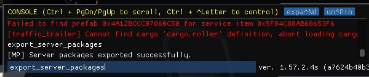
Open the Euro Truck 2 Data folder.
Tends to be here C:\Users\<User>\Documents\Euro Truck Simulator 2Log in to the Kinetic Panel
Stop the server.

Open File Manager.

Navgaite to .local > share > Euro Truck Simulator 2
Replace the server_packages.dat & server_packages.sii with your own
Start the server.