In this article
Huge Harmony is now live on all nodes. Here is the rundown of the change log.
Keep in mind billing, tickets, and migrations are still rolling out over users
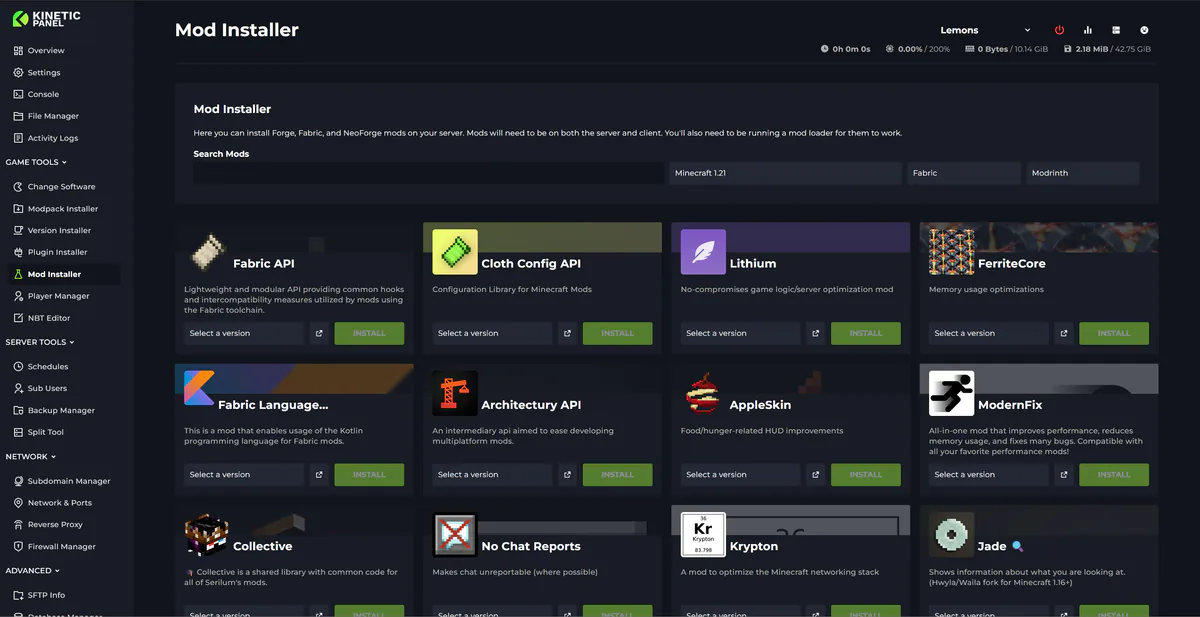
Version Installer
Changed
Refreshed the desktop and mobile installer with a compact installed-version summary, clearer build cards, darker search fields, and matching installation dialogs.
Simplified the software list while keeping the selected option clearly highlighted.
Added
Build filtering for Paper, including an All builds option.
Build filters for Forge, Quilt, NeoForge, and Fabric, matched to the selected Minecraft version.
Fixed
Improved validation and permission checks when replacing installed version files.
First-time Setup and Quick Setup
Changed
Redesigned first-time setup as a full-screen, five-step experience with world artwork and a clear progress indicator.
Each step now matches its corresponding panel page, with a scrolling content area that keeps Back and Continue accessible.
Modpacks use full-width rows with version selectors on the right. Plugin platforms use a grid, while individual plugin installs use rows.
Refreshed Quick Setup templates, progress dialogs, and the minimised progress notice.
Added
Direct choices for Leaf, Purpur, and Pufferfish alongside Paper and Spigot under Plugins.
Individual plugin progress bars that animate during installation and turn green when complete, including when installing several plugins.
Fixed
Plugin downloads no longer remain stuck on Installing after the file has finished downloading.
Setup shows ready versions only, hides modpacks with no ready versions, and clears selections that become unavailable.
Availability is checked again before installation starts.
Long lists and shorter screens no longer push the setup navigation out of reach.
Workspaces
Changed
Refreshed workspace navigation, widget cards, the component picker, buttons, and dialogs to match the panel's new styling.
Updated console, resource graphs, activity, backups, schedules, power controls, storage, world, mod, and file widgets with clearer labels and better compact layouts.
Title widgets now sit directly on the page, including in previews. Divider widgets display just the divider line.
Refreshed clocks, fireplace, night sky, rainy window, snow globe, train window, and other decorative widgets.
The aquarium now uses Fishing Hole's fish artwork and animations, with swaying plants that scale to smaller tanks and dim with the lights. Custom colours, names, moods, and feeding remain available.
Added
JSON, YAML, and XML save warnings in pinned-file editors, with options to keep editing or save anyway.
Fixed
Returning to a server no longer creates another default workspace before saved workspaces finish loading.
Fixed mobile overflow and cramped layouts in smaller widgets.
Existing saved layouts are preserved when loading workspaces.
Dashboard and Server List
Changed
The server list is now the main landing page, bringing servers, welcome content, and news together.
Refreshed server cards with full-width artwork, clearer names and copyable addresses, quieter resource statistics, and direct server/billing actions where available.
Added subtler green online and amber starting animations, with reduced-motion support.
Platform status is accessible from the top bar, with incidents and maintenance shown in its dialog.
Added
Pin up to ten servers, with editable icon and colour choices.
A news carousel with navigation and pause controls.
Fixed
Navigation no longer jumps back to the server list while another page loads. Pagination and browser Back/Forward work consistently.
Missing or broken server artwork falls back to the shared artwork.
Offline servers no longer show stale uptime as if they were still running.
Navigation and Search
Changed
Introduced a separate outer icon rail and clearer sidebar categories for servers, account settings, billing, and support.
Moved page navigation into the sidebar across the panel, reducing repeated tabs and navigation bars.
Tablet layouts keep the left icon rail visible, with a button to open the full menu.
Search results now appear directly in the sidebar while typing. Clear the search or press Escape to restore the menu; Ctrl+K focuses search.
Added
New layout and Legacy layout choices. Legacy groups pages under Main, Game, and Server Tools.
Edit menu controls to create, rename, and reorder categories, move pages, and remove or restore menu items.
Separate saved arrangements for each layout, stored in your browser.
A persistent Restore bar for removed items, plus dedicated Removed items and New category dialogs.
Fixed
Improved navigation on narrower screens, including menu dismissal, keyboard focus, and access to nested dialogs.
The active page and support section highlight more consistently.
Themes and Appearance
Changed
Refreshed page headers, toolbars, lists, buttons, fields, dropdowns, and dialogs across the panel.
Made desktop layouts more compact while improving spacing and stacking on smaller screens.
Server accents dim while offline and brighten during startup, with clearer status text and a power icon.
Updated switches and loading indicators for a more consistent appearance.
Added
Global themes with optional per-server overrides and a Use global theme option.
Default colour themes plus Light, High contrast, XP, Terminal, Glass, 95, Old Steam, Blueprint, Paper, and OLED styles.
Colour and background options for supported themes, plus a Frost effect slider for Glass.
Fixed
A server's saved theme and background now load together, avoiding a flash of the global theme.
Toggle thumbs remain centred at different font sizes and zoom levels.
Tooltips no longer open on focus and immediately close on the same click.
Removed the flashing top loading bar caused by routine background account checks.
File Manager and Editor
Changed
Refreshed file lists, filter bars, menus, upload controls, dialogs, and editor styling.
Upgraded the editor to CodeMirror 6, retaining search, save shortcuts, undo, language selection, and desktop/mobile editing.
Editor colours now follow the panel theme, and language support loads when needed.
Added
Syntax warnings before saving JSON, YAML/YML, and XML files across desktop, mobile, and pinned-file editors. INI files are excluded.
Highlighted error previews, with Keep editing jumping to the reported location. You can still choose Save anyway.
Fixed
Missing files are checked before reading or downloading, avoiding the previous server-error response.
Theme changes no longer reset an open editor's contents or undo history.
Improved editor text, syntax, and line-number contrast in Light, XP, and 95 themes.
Corrected mobile file menus and dialog layouts.
Validation highlights clear when you edit the file.
Console
Changed
Refreshed console surfaces, resource charts, graph controls, and compact statistics.
Chat, Error Log, and Join Log remain separate sidebar pages, with shared message classification across desktop and mobile.
Added
Command autocomplete on desktop, mobile, floating, and full-screen consoles using a
.kpcommandsfile in the server root.Keyboard and touch selection, command descriptions, and version-specific suggestions. Accepting a suggestion fills the input without executing it.
A Minecraft Java example catalogue covering releases from 1.7.10 through 26.2, with version detection from
kpinstalled.txtorkpinstalled.
Fixed
Valid chat messages are no longer discarded because of timestamp, rank, or server-message prefixes.
Chat mentioning errors or joins is no longer incorrectly treated as an error or player-join event.
Autocomplete recognises both supported installation-metadata filenames and uses the Minecraft version rather than the loader or modpack version.
Modpack Manager
Changed
Renamed Modpack Installer to Modpack Manager.
Moved the installed pack and update controls above search, with a collapsible filter sidebar.
Refreshed pack cards and install, import, and export dialogs.
Added
Import modpack and Reset filters actions when a search returns no results.
Fixed
The Filters control opens and closes correctly on desktop and mobile without losing selections.
Improved validation for modpack-file replacements.
Mod Manager
Changed
Opens on installed mods, with Install more mods leading to the catalogue and a clear route back.
Refreshed mod rows, search, lock status, bulk actions, and detail dialogs. File and version details are grouped together.
Disabled mods are easier to identify, with compact download/delete actions and tooltips.
Added
Drag-and-drop uploads for Minecraft, Hytale, Vintage Story, and Windrose, with a themed drop area and the correct destination folders. Windrose retains its import wizard.
A Crash help & debug menu linking to crash tools and Light/Deep mod scans.
Fixed
Locked modpacks explain why updates are unavailable instead of starting an update check.
Uploads respect permissions and prevent duplicate submissions.
Download completion checks no longer keep finished installations polling indefinitely.
Plugin Manager and Datapack Manager
Changed
Combined installation and management into a single entry for each feature.
Both open on installed items, with Install more actions and a route back to management.
Refreshed rows, search, filters, buttons, and dialogs.
World Manager
Changed
World Manager opens on existing saves, with Add more worlds leading to the catalogue.
Refreshed world cards, search, filters, upload controls, and dialogs.
Added
A direct Upload world action from the catalogue, preserving current search and filter selections.
World Map and 3D Explorer
Changed
Refreshed map panels, toolbars, dialogs, and the introductory guide.
Simplified the 3D toolbar, World/Players panels, movement help, and collapsible render settings.
Reworked terrain rendering to remove hidden faces, merge suitable surfaces, and build terrain in the background. The default render distance is ten chunks.
Terrain, player markers, and last-death markers now load in sequence in the 2D map.
Added
A blue sky, square sun, brighter daylight, and haze at the render-distance edge.
Animals, mobs, dropped items, and players at saved-world positions, with names, coordinates, and item counts.
Textured models for bundled vanilla mobs, dropped items, and player skins, plus separate entity/player toggles and a marker display option.
Click players to inspect inventory and statistics, or chests to inspect their contents. Saved mobs can be moved or removed.
Block erasers, cube and sphere brushes, drag-to-select boxes, six resize handles, previews, undo/redo, and discard.
Sponge
.schempreviews and placement from/schematics, including coordinate entry and draggable X/Y/Z handles. Supports up to 100,000 blocks and preserves block orientation and chest contents.Ghost-style last-death markers, a Last deaths filter, and actions to centre on or teleport to a saved death location.
World edits require the server to be stopped and an explicit save. Schematics must match the world's Minecraft data version; older .schematic files need conversion, and entity/biome import is not included. Death markers use saved player data, and teleporting requires the player to be online.
Fixed
Camera movement no longer snaps back when terrain updates.
Reduced repeated rebuilds and released obsolete rendering resources during exploration.
Corrected stair orientation, special blocks, sloped rails, and partial-block shapes.
Fixed black backgrounds on transparent textures and incorrect sizing/timing of animated textures.
Corrected biome grass, foliage, and water colours, including cherry leaves incorrectly appearing green.
Fixed hidden faces and seams across chunk boundaries, including negative coordinates and cutaways.
Improved surface detection, chunk palette handling, and removal of data associated with deleted blocks.
Prevented stale schematic previews or coordinates from being saved after a selection changes.
Fixed map loading getting stuck when the browser could not start the background renderer.
Player Manager
Changed
Refreshed player lists, search, filters, dialogs, inventory views, and data editors.
Added a clearer No players yet presentation.
Added
Last-death coordinates in Player Details and Teleport to last death for online players.
Fixed
Inventory, ender-chest, chest, and item-picker views now resolve the correct item textures, including stairs.
Last-death actions refresh the saved location and respect its dimension before teleporting.
Backups and Storage
Changed
Refreshed backup lists, menus, controls, and confirmation dialogs.
Moved guidance into Backup help, with a direct Excluded files action.
Replaced the storage ring with an animated horizontal usage bar, retaining warning colours and usage figures.
Updated storage cards and prune dialogs.
Added
A four-step Backup guide that remembers dismissal and can be reopened.
Server Settings, Game Rules, and Startup Flags
Changed
Refreshed settings forms, server properties, game-rule cards, and dialogs, with settings navigation in the main sidebar.
Improved label/help placement and mobile stacking.
Updated the startup preset toolbar and flag builder while retaining the command editor, memory preview, and grouped memory inputs.
Added
A More settings shortcut from Minecraft settings to server properties.
Fixed
Switching from Custom startup flags to a preset now warns before clearing both custom flag fields. Cancelling preserves the current settings.
Crash Manager, Health Check, and Profiler
Changed
Refreshed crash lists, report details, help, and full-log windows, with clearer separation between the list and selected report.
Made suggested fixes more prominent and moved related actions beside the recent log output.
Updated Health Check with a compact score summary and clearer findings.
Refreshed Profiler Analyzer inputs, results, suggested actions, and help.
Fixed
Health Check no longer displays a healthy score before the results finish loading.
Network and Ports
Changed
Refreshed allocation rows, controls, help, and deletion dialogs on desktop and mobile.
Updated Network Test with clearer status colours and expandable result details.
Added
TCP & UDP labels on allocations and an Open badge while the server is online.
A Notes button for each port, opening an editor with Save and Cancel. Saved notes appear beneath the address.
Fixed
Corrected mobile note entry and misleading description text that referred to the IP alias rather than port notes.
Subdomains, Reverse Proxy, and Firewall
Changed
Refreshed Subdomain Manager rows, toolbars, and create/delete dialogs.
Updated Reverse Proxy with clearer SSL badges and matching controls.
Updated Firewall Manager with clearer Allow/Block colours and redesigned rule dialogs, preserving rule ordering.
Databases
Changed
Refreshed database lists, search, and create/details/delete dialogs, with guidance grouped under Database help.
Added
Add and remove allowed connection addresses from database details on desktop and mobile.
Fixed
Removing allowed addresses containing a slash, including supported netmask entries, now works correctly.
Splits and Instances
Changed
Refreshed split resource summaries, search, server rows, controls, and confirmation dialogs.
Updated Instances with clearer status rows, search, and matching dialogs.
Added
First-visit guides for Splits and Instances, with controls to reopen them later.
Fixed
Fixed a mobile split-form crash and tightened the name confirmation required before deletion.
Schedules and Activity
Changed
Schedule names, next/last run times, task times, and actions are easier to scan, with one timezone label for the schedule list.
Refreshed crash, account, and server activity lists and detail dialogs.
Activity icons now distinguish errors, successful actions, restarts, files, backups, and network actions with clearer colours.
Added
A Payload dialog for viewing full schedule-task text.
Server Subusers and Custom Roles
Changed
Refreshed user rows, permission controls, role editing, and dialogs.
Custom roles now show saved roles first, with separate create/edit steps.
Added
Permission search across names, descriptions, and groups, without losing selected permissions.
Fixed
Permission search now has a single clear control.
Game Selection, Toolbox, and Other Game Tools
Changed
Change Game now uses portrait artwork cards with a clear current-game badge.
Refreshed the Toolbox and its MOTD generator, player-head generator, portal converter, region-coordinate converter, and UUID lookup.
Updated Hytale, Vintage Story, and Windrose managers/installers, Palworld installers, and Rust auto-wipe.
Refreshed Tools and Installers hubs, SFTP, server support, About, and unavailable/no-permission screens.
Account, Login, and API Pages
Changed
Refreshed login, registration, account details, security, activity, SSH keys, and related dialogs.
Grouped account and API pages in their own navigation section.
Updated API documentation and credential-management layouts with clearer toolbars, rows, and dialogs.
Added
Account email history with readable previews where message content is available. Verification-code previews remain private.
Fixed
CAPTCHA layouts use horizontal presentation where space permits and compact presentation on narrower screens.
Email previews no longer show raw HTML and styling code.
News and Panel Updates
Changed
Refreshed Kinetic News on desktop and mobile, including article cards and loading, empty, and error states.
Updated the latest-update artwork and past-update navigation, with a horizontal version list on mobile.
Added
A seven-page Harmony introduction with Back/Next controls and remembered dismissal, replacing the previous welcome-video experience. Reopen it through Explore Harmony.
Fixed
News follows category pagination so older Kinetic News posts are not missed.
Billing Changes
Added
Store and package browsing
Browse games and software, choose a location, and compare available hosting packages before ordering.
Search and filter the catalogue, review package resources, and see prices in your selected billing currency.
Choose from the billing cycles offered for a package, including weekly, monthly, quarterly, six-month, and annual options where available.
Review cycle savings and the package, game, location, and extras together before checkout.
Browse Grandma's Deals for special packages, with their location, resources, and pricing shown before ordering.
Use Granny Sherman's questions and guidance to learn about the available deals.
Browse the public store without signing in, then log in or create an account when you are ready to buy.
Checkout and payments
Complete purchases through an integrated payment form in the panel.
Review the order breakdown, applicable discounts, taxes, optional contributions, account credit, and amount to pay.
Add supported add-ons and configuration upgrades to a server order, with quantity controls where applicable.
Apply an eligible creator code and see its available benefits before paying.
Choose whether to use available account credit, with any remaining amount collected through checkout.
Sign in or create an account during checkout, including the required contact details and verification steps.
Choose whether to save a payment method for future purchases where offered. Methods needed for subscription renewals are identified separately.
Complete supported bank-authentication steps during checkout and return to the order afterwards.
Resume an existing checkout, retry where available, or cancel an unpaid order.
Review and accept the Terms of Service when placing a new server order.
Services and subscriptions
View your hosting services with status, plan, price, billing cycle, location, and next renewal or paid-through date.
Search your services and view inactive entries as well as active services.
Open the game panel directly from a service.
Inspect a service's package, configuration upgrades, add-ons, recurring contributions, and payment history in one place.
View related split servers and open their panels from the parent service.
See pending payments, requested changes, and cancellation information alongside the affected service.
Plan changes and renewals
Compare eligible replacement plans, with the current package highlighted and upgrade/downgrade information shown before confirmation.
Request an upgrade or downgrade and review the charge or account-credit treatment before proceeding.
Change to another available billing cycle and see the relevant payment, credit, and term information.
Stop automatic renewal and switch to manual payments where supported, or resume auto-pay with an eligible payment method.
Use Pay manually to renew an eligible service, choose an available cycle, and purchase between one and twelve cycles at once.
Apply available discounts and account credit to supported manual renewals.
View the updated renewal or paid-through date after a completed change.
Add-ons and configuration upgrades
Browse extra storage, backups, and other configured resource packages.
Select an eligible service and, where required, the target for an upgrade.
Purchase account-wide add-ons where offered, applying their benefits to eligible services on the account.
Adjust quantities for supported add-ons and configuration upgrades.
Review the price and billing interval before purchasing, with options matched to the service and currency.
View existing extras from service details and reduce or cancel eligible extras through their management controls.
Cancellations
Request service cancellation with a reason and a clear confirmation of what happens to the server and its data.
See the scheduled cancellation alongside the service's renewal information.
Remove a pending cancellation where the service is still eligible.
Cancel an unpaid order before it becomes an active service.
See when cancelling the last active service also affects account-wide add-ons.
Currencies
Choose a supported billing currency for catalogue browsing and new purchases.
Hold recurring services in more than one supported currency under the same billing account.
Keep existing subscriptions in their purchased currency when changing your browsing preference.
View separate balances for each currency; account credit is not automatically converted between currencies.
Identify saved payment methods and defaults by their associated currency.
Payment methods and billing details
Add a supported payment method, view saved methods, choose a default, and remove methods where permitted.
Add a payment method for a particular service's subscription when needed.
Edit a saved method's billing name, email, phone number, address, and card expiry. Replacing a card number uses the add-card flow.
Identify saved Link methods by their email address, with guidance distinguishing the Link wallet from methods saved to the billing account.
Manage billing contact details and the billing email used for new checkouts from Account settings.
Invoices and refunds
View account-wide invoices and the invoices associated with an individual service.
Review invoice references, dates, currencies, totals, payment states, and associated services.
Browse invoice history in pages rather than loading the entire history at once.
Open invoice documents, download PDFs, and access receipts or provider invoice pages where available.
View refund amounts, dates, and statuses, including partial refunds, alongside the original invoice.
Account credit and gift cards
Buy account credit in a supported currency and use eligible balances for purchases and renewals.
See available credit alongside the store and checkout.
Distinguish purchase-only credit, withdrawable earnings, and pending amounts where those balance types apply.
Purchase gift cards in the available denominations and share their codes.
View purchased gift cards, their value, currency, and status, and copy a code directly from the panel.
Redeem a gift-card code into account credit, with confirmation when a code has already been redeemed.
Sherman points and rewards
Earn Sherman points from qualifying new services, renewals, upgrades, and add-on purchases under the displayed earning rules.
View your points balance and browse the rewards store.
Redeem points for configured account-credit rewards or resource perks on an eligible service.
Compare each reward's cost, benefit, and one-time or monthly recurrence before redeeming.
Choose which eligible service receives a resource reward.
View active perks and the service or account they apply to.
Follow your qualifying-month streak, upcoming milestones, and unlocked renewal-points multipliers.
Review points earned, spent, and adjusted in the activity log, including the balance after each entry.
Use Sherman's shopkeeper guidance to understand rewards and earning rules.
Shared billing accounts
Invite another person by email to access your billing account through their own panel login.
Accept invitations from the panel with email verification, or through the invitation link.
See pending invitations and choose to accept them or return to them later.
Switch between your own billing account and accounts shared with you from the top navigation.
Grant separate permissions for services, ordering, invoices, credit, payment methods, affiliate tools, and support.
Set service permissions for all servers or override viewing, changes, and cancellation permissions for individual services.
Search permission names, descriptions, and groups while configuring access.
Review members and pending invitations, update permissions, or remove access as the account owner.
Billing sharing does not automatically grant access to server consoles or files; those remain controlled by server subuser permissions.
Affiliates and creator codes
Access an affiliate overview with your programme status, creator code, referral link, commission details, and assigned benefits.
Copy your referral link or creator code for sharing.
Add source tags to referral links and compare where visits and orders originate.
Track referral clicks, checkouts, earnings, pending amounts, withdrawable balances, and completed payouts.
Review the benefits assigned to your code, including applicable discounts and resource perks.
Configure available Round Up options for supporters.
Affiliate reports and withdrawals
Compare earnings and payouts over selectable date ranges and reporting currencies.
View charts, traffic-source breakdowns, and searchable referral-source results.
Read monthly statements with individual commission and Round Up entries, recorded times, and withdrawal activity.
Search and filter statements, export reports as CSV, and print or save a statement as a PDF.
Request a withdrawal from an eligible balance using PayPal or bank transfer, subject to the displayed minimum and available amount.
Provide the payout details and an optional note required for your request.
Track pending and completed requests and open the associated support conversation where available.
See purchase-only and pending funds separately from the amount available to withdraw.
Round Up
Choose an optional contribution to support an eligible affiliate when placing an order.
Select a rounding increment from one to ten currency units and review the actual contribution before paying.
Choose a one-time contribution or include it in renewals where offered.
View the recurring contribution in Services and remove it from future renewals without cancelling the hosting service.
See Round Up proceeds separately from referral commission in affiliate earnings and statements.
Community pots
Create a public page that lets your community contribute towards hosting through account credit.
Set the page name, public address, description, publication state, and branding.
Upload a header and logo to personalise the page.
Set an optional funding goal and its currency, with private progress and contribution totals.
Choose whether total raised and funding progress appear publicly.
Configure minimum and maximum contributions and a thank-you message.
Share the public page and accept one-time contributions through guest checkout.
View your public link, funding progress, and contribution totals by currency from the owner dashboard.
Configure one-time support, memberships, and the news feed separately, with membership and publishing features available to eligible affiliates.
Save setup sections independently while retaining unfinished edits when moving between them.
Creator Studio
Create and manage public posts and posts restricted to a membership level.
Write in Markdown, preview content, and save drafts before publishing.
Upload post images and choose a thumbnail for the public preview.
Show limited previews of locked posts while keeping the full content restricted to eligible members.
Create, price, edit, and archive monthly membership levels in supported currencies.
Offer cumulative membership access, so higher levels include posts available to lower levels.
Manage posts and membership levels separately from your public community page.
Supporting creators and memberships
Browse and search the Support a Creator directory.
Open creator pages to read public posts, view membership options, and make enabled one-time contributions.
Sign in or create an account to purchase a monthly creator membership.
Read posts included in your paid membership level.
Manage creator subscriptions separately from hosting services.
Cancel a membership's renewal while retaining access through its paid-through date.
Support tickets
Create tickets from your account and associate a service where appropriate.
Search and filter your ticket list and review the complete conversation.
Write formatted messages with links, lists, and supported attachments.
Reply to an existing ticket with attachments alone, without adding placeholder text.
View ticket status, details, staff replies, and attached files, and close a conversation when resolved.
Receive new-reply indicators and notifications, with mobile conversations keeping the reply box accessible above the keyboard.
See relevant support information above the message box and automatic acknowledgements where configured.
Open a guest ticket without signing in and use a private emailed link to read and reply to the conversation.
Where email support is enabled, send a new email to create a ticket or reply by email to continue it. Accepted replies can reopen a closed ticket, and supported attachments are included.
Live chat
Start a support conversation from the panel or supported public pages when live chat is available.
Exchange messages with support, see typing activity, and return to an existing conversation.
Receive opening and reply acknowledgements where configured, without restarting the welcome every time the chat is reopened.
See availability information and close the conversation when finished.
Fishing Hole
Play the desktop Fishing Hole while waiting for a support reply.
Catch fish with different scores and reeling challenges, with feedback for catches and misses.
Track your current score, catches, misses, and personal best.
Submit an eligible score under a short display name and compare it with the leaderboard.
Receive a support-reply notice while playing.
Existing-customer migration
Where migration access is offered, request that eligible existing servers move into the billing system.
Choose the billing currency for the request and review the servers included.
Follow the request's progress and see servers already attached to billing.
Confirm a currency for an older request when prompted, without recreating the request.
Account communications and mobile access
View account email history and readable previews when message content is available; verification-code previews remain private.
Receive configured emails for purchases, service events, invitations, and support conversations.
Use the mobile billing interface for shopping, checkout, services, invoices, saved methods, credit, rewards, affiliates, community features, and tickets.
Access support, help resources, and service-status links from the billing navigation.
What do you think?
Loading reactions…