
In this guide
These sections will cover how to find / Download mods for Stardew Valley to upload to your server. We have covered Curseforge & Nexus.
Getting Mods from CurseForge
CurseForge makes it easy to install mods on your client. You can also use it to access the mod files from your server.
This guide assumes you’ve already added mods to your CurseForge client.
Open CurseForge.
Click on Stardew.
Click the three dots in the top right corner.

Select
"Open Mods Folder"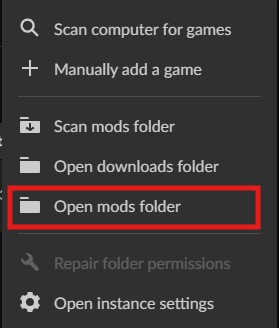
Find the mod you want to upload, then right-click it and choose "Compress to ZIP" (or similar).
Downloading Mods from Nexus Mods
Nexus This guide assumes you're already on the Nexus Mods website.
Click on the mod you want to add to your server.
Click "Manual Download."

Downloading mods Via Moddrop
Find the mod you wish to install.
Click download.