How to Create a Steam Workshop Collection
Last updated 08 Aug 2025
Need a game server?
Spin one up fast with our feature-rich panel and seriously low prices.
1. Go to steam workshop.
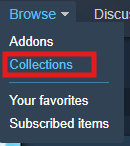
2. Go to browse > Collections.
3. Click on Create Collection.

4. Fill out the form & Click Save and continue
5. Add a Background image.
6. On any mod you wish to add to this collection, Click Add To Collection

7. Back on the main workshop page Go to browse Subscribed items.
8. Click Collections > Items.
9. Click your Collection.