
How to join a Enshrouded Server

Last updated 07 Jun 2025

Need a game server?

Spin one up fast with our feature-rich panel and seriously low prices.

This guide will show you how to join your Enshrouded server.

1 Login to the Kinetic Panel.

2 Head to the Network & Ports section.
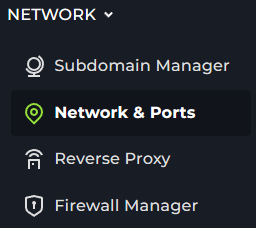
Network

3 You will want to look for the port 27015, with the IP address next to it.

Settings

4 Now, open up steam and go to View > Game Servers
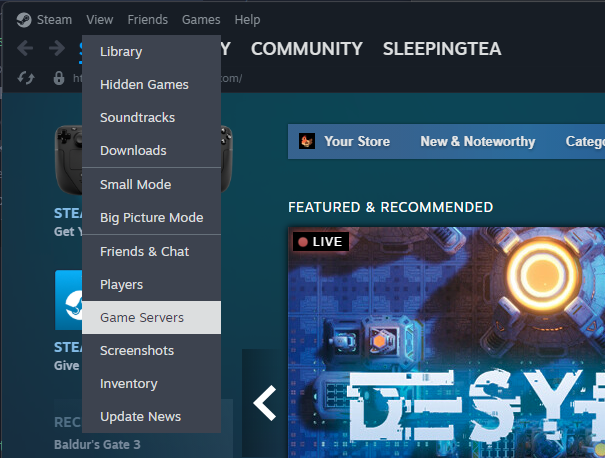
Steam Server Finder

5 This will open a window, select favorites from the top bar.

Steam Server Finder

6 Then press the plus button at the bottom of the window.

Steam Server Finder

7 From there, the server browser should've refreshed & you can see your server there, all you need to do is Connect to it.

Steam Server Finder

8 From there, you should be connecting to your Enshrouded server in game, you may also need to enter the Server Password again before connecting.

Display and navigation

Accessibility options

Personalise how Kinetic Hosting looks and how you move around it. Your choices are saved on this device.

Press Ctrl+K to search. When link hints are enabled, hold Shift to label every visible link and control.

High-contrast dark theme

Use black and dark backgrounds with white text and stronger borders throughout the site.

Keyboard link hints

Hold Shift to show a temporary key on every visible link and control. Keep holding Shift and type a label to activate it.

Keyboard navigation

Ctrl+K opens site search. When link hints are enabled, hold Shift to label every visible page link, menu item, order control and location. Keep Shift held while typing the displayed label, or release Shift to close the labels.

Search Kinetic Hosting

Search site pages, game servers, knowledgebase articles, blog posts, FAQs and modpacks.

Enter at least two characters to search the site.

↑↓ Select · Enter Open · Esc CloseCtrl+K