
Open the Game
Go to the mods manager
Enable the desired mods
Enter Drive
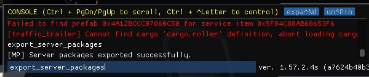
Open the Dev console
Type export_server_packages (Only works while driving)
Open the American Truck Simulator Data folder.
Tends to be here C:\Users\<User>\Documents\American Truck SimulatorLog in to the Kinetic Panel
Stop the server.

Open File Manager.

Navgaite to .local > share > American Truck Simulator
Replace the server_packages.dat & server_packages.sii with your own
Start the server.

American Truck Simulator guide
How to add Mods to your American Truck Simulator Server
This guide will show you how to add mods to your American Truck Simulator. Allowing you to add new vehicles, Traffic