Panel 6.9 Update Change Log
Posted by Cole | 3 February 2026
We know, it wasn’t that long ago we released Panel 6, but we’re here with the 9th version of Panel 6, after many bug fixes and some very cool features, the panel is now in your hands, ready to play around with!
If you don’t currently have a server but you find these new features interesting, check out our plans on our website. We offer the best possible servers whilst keeping the price as low as we can! You can check out our Minecraft Plans here.
Change Log
Mod Installers
Changed:
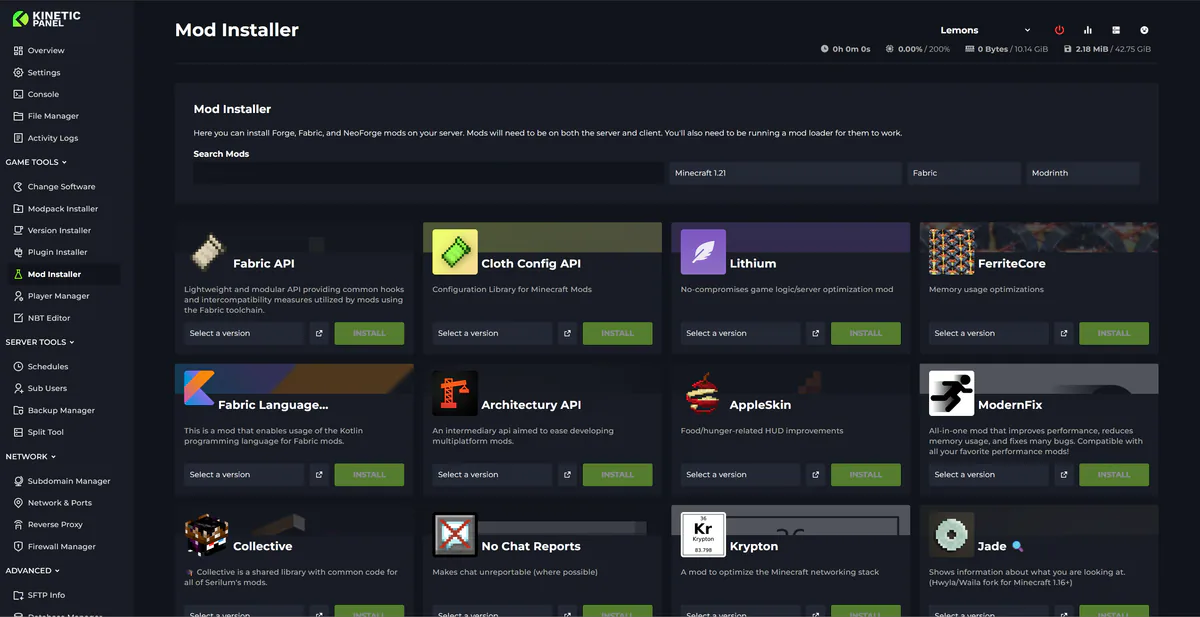
UI Has been redone to fit screens better and fix the install button sitting under the dropdown
Added:
You can now see what mods are installed in the installers
You can now uninstall mods via the installer
You can now update mods via the installer
The Mod Installer now shows dependencies
Mods are now checked on page load to see if they’re client-side or not
Warning shows if you delete or disable a mod that other mods are dependent on
Vintage Story - Mod Installer
Added:
Vintage Story now has its own mod installer
World Map
Added:
2d World Map. See your full world with a very detailed world map
See player locations on the map and teleport to their location
See items, mobs and entity locations
See a playtime heatmap of players
Use the Y scale to change the height and see caves and underground locations
Users can mass select chunks
Selecting or Mass Selecting chunks allows users to delete entities in the chunks or the chunks themselves
Pressing on a user's head allows you to edit their data, health, inventory, location, food and experience.
NBT Editor (3D Chunk View)
Changed:
Full rework of controls and make it easier to use
Removed old beta notice and wording about chunks
Full UI rework to look more like the map view
View now change size based on screen
You can no longer save without powering down the server
Added:
Stage button now flashes if it hasn’t been pressed
You can now fold away the chunk list at the side
The ctrl key can be pressed to enable delete mode
You can now paint and drag with the delete mode
You can now cut the chunk y/x to see blocks inside the chunk
You can now move around with WASD or arrow keys
You can now tilt the camera with Q and E or middle mouse
Fixed:
Block textures no longer load upside down
Most blocks that had missing textures
Movement slowing when close to the chunk
Chunk blocks getting messed up when you delete something
Top of chunks rendering in the wrong layout
Workspaces
Changed:
We’ve done some big reworks to the fish…
Fish now have emotions and will act based on how they’re feeling
Feeding the fish now makes them feel full
Fish now have names
You can now tap on the glass to make the fish swim away
Fish logic has been reworked
You can now change the light colour in the tank
Redone plans
Redone sounds
Added:
Snoot
Fixed:
Workspaces no longer keep making the default workspace
The fish after feeding no longer glitch back
The fish now move a lot smoother and more random
Fixed rain not filling it’s widget height
Consoles
Changed:
New design for the console to match its widget
Added:
New join log console
New error log console
Navigation Changes
Changed:
Customise button has been moved to the bottom
Added:
New sub categories now help order the side bar
Menu can now be set to only show icons to give more screen space
New buttons for last update and about panel
You can pin items in sub categories back to the main menu with right click
Fixed:
Fade looking odd on mobile
Menu blending into backgrounds on mobile
Modpack Installer
Fixed:
Modpack updater no longer shows mods that are part of the modpack as extras
Datapack Manager
Fixed:
Now only shows for datapack folders inside the world
File Editor
Changed:
Find menu
Added:
Find and Replace
Player Manager
Changed:
Player manager now checks if the player is online before allowing you to save
Fixed:
UI overlaying the inventory on smaller screens
The armour slots being reset sometimes on save.
Other
Added:
Shortcuts. Lots of actions now have shortcuts on the panel. You can now open the shortcut menu to see the full list of shortcuts or open the shortcut overlay
Search. CTRL + K now opens a search window. In here you can search for pages in the panel to quickly jump to them
Removed:
Bug report system. People can’t read
Fixed:
Fixed modals not sitting in the middle of the screen
Fixed loading… showing sometimes and not the spinner
Fixed spinner being too thin on buttons
Fixed the mass select box not sitting in the middle of the screen
Fixed small spinner being too thin
Next Steps
What’s next? Well, for us it’s working on Panel 6.10 and a few other very cool projects we hope for you to be able to see soon!
But for you, the next steps are to get started with the new features! We’re especially proud of the new map that we created, allowing you to view your world from inside the panel!
If you haven’t already got a server with us, join the movement! We offer the lowest cost and the best performing servers out there, you can check us out here.
Start Your Own Server
Looking for a game server? Get set up in a few moments. With our one-click installers and simple packages.
Related Posts
Changes To Panel Updates
We launched the Kinetic Panel back in 2022, and up until now, most features have been added through major updates. This approach sometimes meant that features were completed but had to wait for other features to be finalized before release. While this was unavoidable in some cases, such as with the significant UI reworks in Panel 3 and Panel 4, it has occasionally left features you could have been using just sitting there.
Chris19 August 2024

Panel 6.11 Update Change Log
Panel update 6.11 is live on all nodes. It comes with bug fixes, new server folders, and a new mobile text editor. The update was planned to be bigger and include Rust auto-wipe features, and more Minecraft start-up options, but this has been pushed to 6.12 that will drop next week.
Chris20 February 2026
Panel 26.23.0 Update Change Log
A huge update has now rolled out on our panel. It comes with a load of QoL changes, new features, and big under the hood changes making the panel feel more snappy
Chris28 June 2026
Panel 6.10 Update Change Log
6.10 is live on all nodes, and its a big one. The update comes with a new mobile UI built form the ground up, markers for the world map, tools box, minecraft server health check, and a spark profiler analyzer
Chris16 February 2026
Panel 26.26.0 Update Change Log
Big update for palworld today, along with a few other changes. Palworld now has a mod installer, world manager, and a world import tool.
Chris16 July 2026
Changes To How We Update Our Panel
We're making some changes to up we update our panel. Find out more about these changes, and see all the features coming in the next panel update here
Chris13 June 2026