Project Zomboid Admin Commands
Last updated 08 Jun 2025
Need a game server?
Spin one up fast with our feature-rich panel and seriously low prices.
Admin commands on a Project Zomboid server can be useful to modify the game's settings, spawn items and do much more. There are a few ways to do the following commands.
Through the Console
The first way to use Project Zomboid commands will be through your Servers Console.
1 Login to the Kinetic Panel
2 Navigate to the Console Page
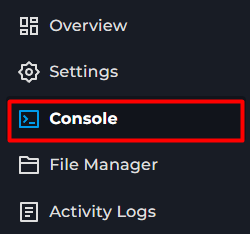
3 From there you can enter commands within your servers console.
When putting commands in Console, you will not need to put '/' when entering commands.
List of general commands.
Name | Description | Command |
|---|---|---|
additem | Gives an Item to a player. | /additem "user" "module.item" |
addvehicle | Spawns a vehicle. | /addvehicle "user" |
addxp | Gives XP to a Player. | /addxp “user” “perk=XP” |
alarm | Sounds an Alarm in the Position of the Admin. Must be inside a room. | /alarm |
changeoption | Changes a server option. | /changeoption option="newOption" |
chopper | Places a Helicopter event on a random player. | /chopper |
changepwd | Changes your password. | /changepwd “pwd” “newPwd” |
createhorde | Spawns a horde near a player | /createhorde “number” |
godmode | Makes a player invincible. | /godmode “user” |
gunshot | Makes a gunshot noise near the player. | /gunshot |
help | Brings up the help menu. | /help |
invisible | Makes the player invisible to Zombies. | /invisible “user” |
noclip | Allows the player to pass through solid objects | /noclip “user” |
quit | Saves and shuts down the server | /save |
releasesafehouse | Releases a safehouse you own. | /releasesafehouse |
reloadoptions | Reloads server options. | /reloadoptions |
replay | Records and plays a replay for a moving player. | /replay “user” [-record | -play | -stop] “filename” |
save | Saves the current server world. | /save |
sendpulse | Toggles sending server performance information to the client. | /sendpulse |
showoptions | Shows a list of current server options and values. | /showoptions |
startrain or stoprain | Starts or Stops server rain. | /startrain or /stoprain |
teleport | Teleports to a player. | /teleport “toUser” or /teleport “user” “toUser” |
teleportto | Teleports to specific coordinates | /teleportto x,y,z |
List of Moderation commands.
Name | Description | Command |
|---|---|---|
addalltowhitelist | Adds all current users connected to the server with a password to the Whitelist. | /addalltowhitelist |
adduser | Adds a new user to the whitelist. | /addvehicle "user" |
addusertowhitelist or removeuserfromwhitelist | Adds or Removes a player connected with a password to the whitelist. | /addusertowhitelist “user” |
banid or unbanid | Bans or unbans a SteamID | /[ban or unban]id “SteamID” |
banuser or unbanuser | bans or unbans a player. | /[ban or unban] “user” |
grantadmin or removeadmin | Grants or revokes admin rights to a user. | /[grantadmin or removeadmin] “user” |
kickuser | Kick a player from the server. | /kickuser "user" |
players | Lists all currently online players. | /players |
servermsg | Sends a message to all players | /servermsg “message” |
setaccesslevel | Set the access/permission level of a player. | /setaccesslevel "user" |
voiceban | Bans a player from using the Voice Chat. | /voiceban “user” [-true | -false] |