How To Change Your 7 Days To Die Server Difficulty
Last updated 15 Aug 2025
Need a game server?
Spin one up fast with our feature-rich panel and seriously low prices.
Available Difficulties
Below you can find all available difficulties along with their game modifiers.
Difficulty | Level | Skill | Description | % Damage by Zombie | % Damage by Player |
|---|---|---|---|---|---|
0 | Scavenger | Easiest | Easiest setting designed for new players. | 50 | 200 |
1 | Adventurer | Easy | Not just a new recruit any more. | 75 | 150 |
2 | Nomad | Normal | Designed for experienced FPS players. | 100 | 100 |
3 | Warrior | Hard | Now you're starting to impress. | 150 | 83 |
4 | Survivalist | Harder | Kids don't try this at home! | 200 | 66 |
5 | Insane | Hardest | You're one brave Mother! | 250 | 50 |
Setting Your Server Difficulty
1 Login to the Kinetic Panel and Stop your server.
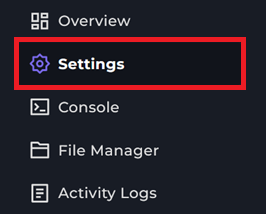
2 Go to the Settings
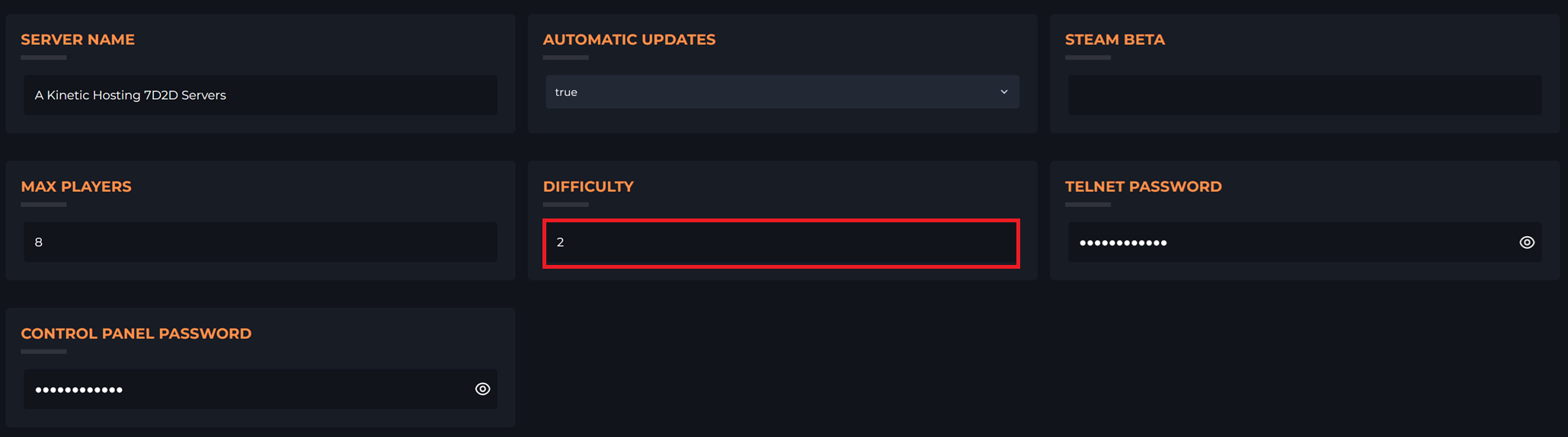
3 Locate the Difficulty dropdown and select the level you want.
4 Restart your server to apply the change